SEO with Éclair
Contents
SEO with Éclair starts before you even write your first post: the sitemap, structured data, redirects and clean URLs are handled for you. Your work focuses on each piece of content: keyphrase, title, description, structure and links. This lesson details what's automatic, what the live analysis checks and the method for reaching 100, applied to Atelier Nova.
What you'll be able to do
Know the automatic foundation
Sitemap, robots.txt, JSON-LD, redirects: what Éclair does without you.
Optimize each piece of content
Keyphrase, SEO title, meta description and structure at the right thresholds.
Reach 100 and stay there
An 8-step method and the right tracking tools.
SEO with Éclair: what's automatic
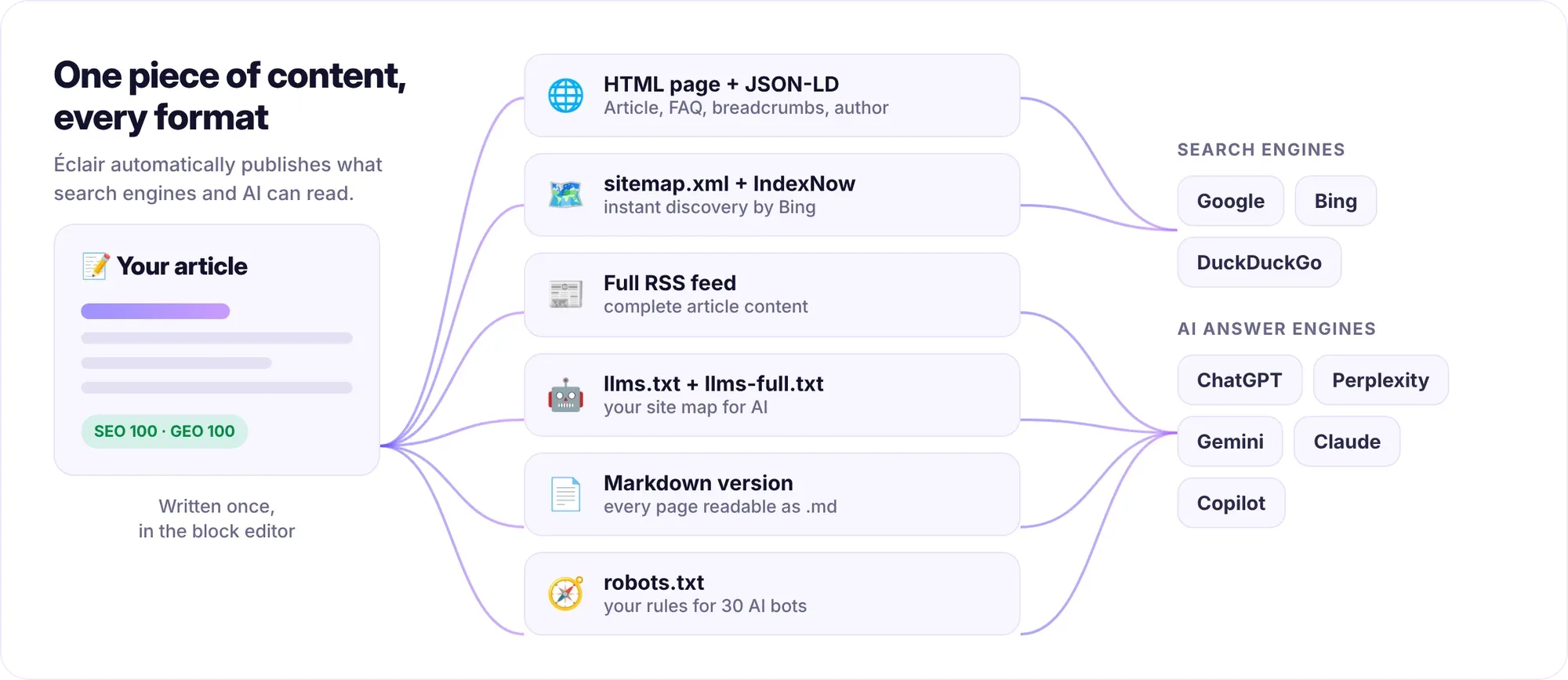
Everything technical works with no setup and no plugin to install:
| Element | What Éclair does | Where to check |
|---|---|---|
| URLs | Clean and lowercase, a single URL per piece of content: HTTPS, www, trailing slash, uppercase and index.php are redirected | Address bar |
| URL change | Automatic 301 redirect from the old URL to the new one | Redirects |
| Sitemap | Dates, images and language versions (hreflang), noindex pages excluded | /sitemap.xml |
| robots.txt | Generated, with the sitemap URL and the rules for AI bots | /robots.txt |
| Structured data | JSON-LD: WebSite, Organization, Person or LocalBusiness, WebPage, BlogPosting, BreadcrumbList, FAQPage, Product… | Page source code |
| Sharing | Open Graph and Twitter Cards, 1200×630 image generated | Link preview on a social network |
| Navigation | Breadcrumbs displayed and marked up, canonical URL on every page | Top of the page, source code |
| RSS feed | The last 20 posts, full text | /feed.xml |
Redirects to HTTPS and to the www or non-www version kick in once the site address has been verified on the Security page, and the Force HTTPS option in Settings › Advanced also enforces HTTPS. That way, a wrong address can't hijack anyone.
SEO title, meta description and Google preview
In the editor, the SEO tab gathers what Google shows of your page: a preview of the result, then the SEO title (counter out of 60), Meta description (counter out of 160) and Focus keyphrase fields. The Advanced options contain the Canonical URL (optional), to fill in only if the content copies another page, and the Don't index this page (noindex) checkbox.
Empty SEO title: Éclair builds the title with the format in Settings › SEO › Title format, by default “{title} · {site}”, which gives “Wheel-throwing classes · Atelier Nova”. Filled-in SEO title: it replaces the page's whole title, as is. Add your site's name yourself if you want it.
Empty meta description: Éclair falls back on Key takeaways or the beginning of the text, but the analysis flags it in red. A description written on purpose, with a clear promise, makes people more likely to click. Here are the settings for Atelier Nova's classes page:
Focus keyphrase: pottery classes in Lyon
SEO title: Pottery classes in Lyon for beginners · Atelier Nova
Meta description: Pottery classes in Lyon in small groups of 6: wheel throwing and hand building, materials and firings included, 10-session course. Sign up online.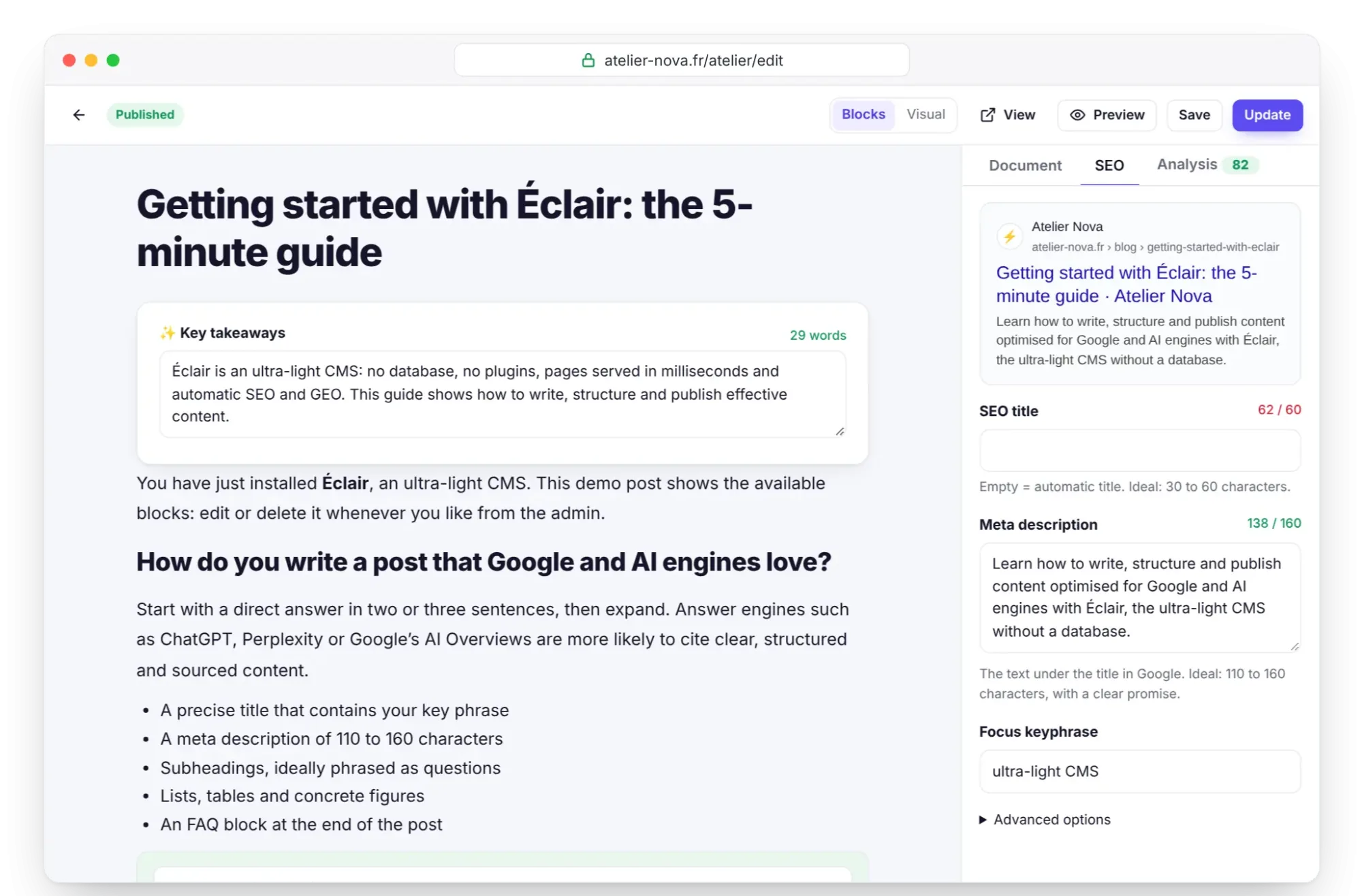
What the live SEO analysis checks
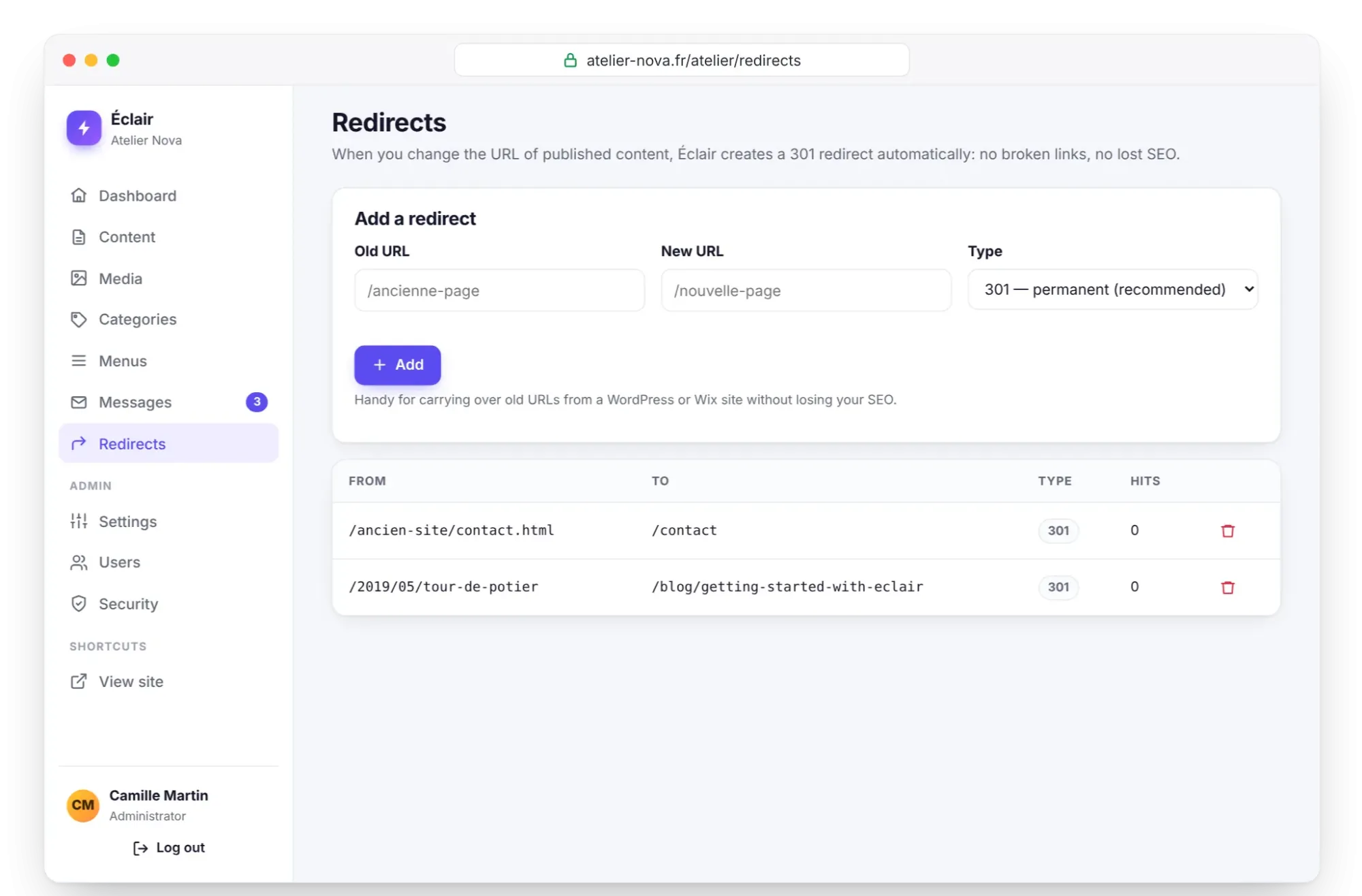
The Analysis tab recalculates the score as you write. Each check turns green, orange or red. Some count double (title, description, keyphrase in the title, text length); noindex and the placeholders left by the AI assistant count triple. The ring is green from 80 and orange from 50.
| Check | Green if… |
|---|---|
| SEO title | 30 to 60 characters (orange from 20 to 29 and from 61 to 70) |
| Meta description | 110 to 160 characters (red if it's empty) |
| Keyphrase | Present in the title (red otherwise), the meta description, the URL, the introduction and at least one subheading |
| Keyphrase density | 0.4% to 3% (red above 3%) |
| Length | 600 words for a post, 250 for a page, 150 for a product page or a page with a banner or features |
| Subheadings | At least 2 (posts and texts over 300 words) |
| Images | All with alt text |
| Internal links | At least 2 (posts and texts over 300 words) |
| Featured image | Present on a post |
| URL | 75 characters at most |
| Indexing | No noindex |
| AI draft | No “To complete” passage left |
Product pages get extra checks: price, payment link, number of photos, brand and product code (the lightweight shop).
Redirects to keep your rankings
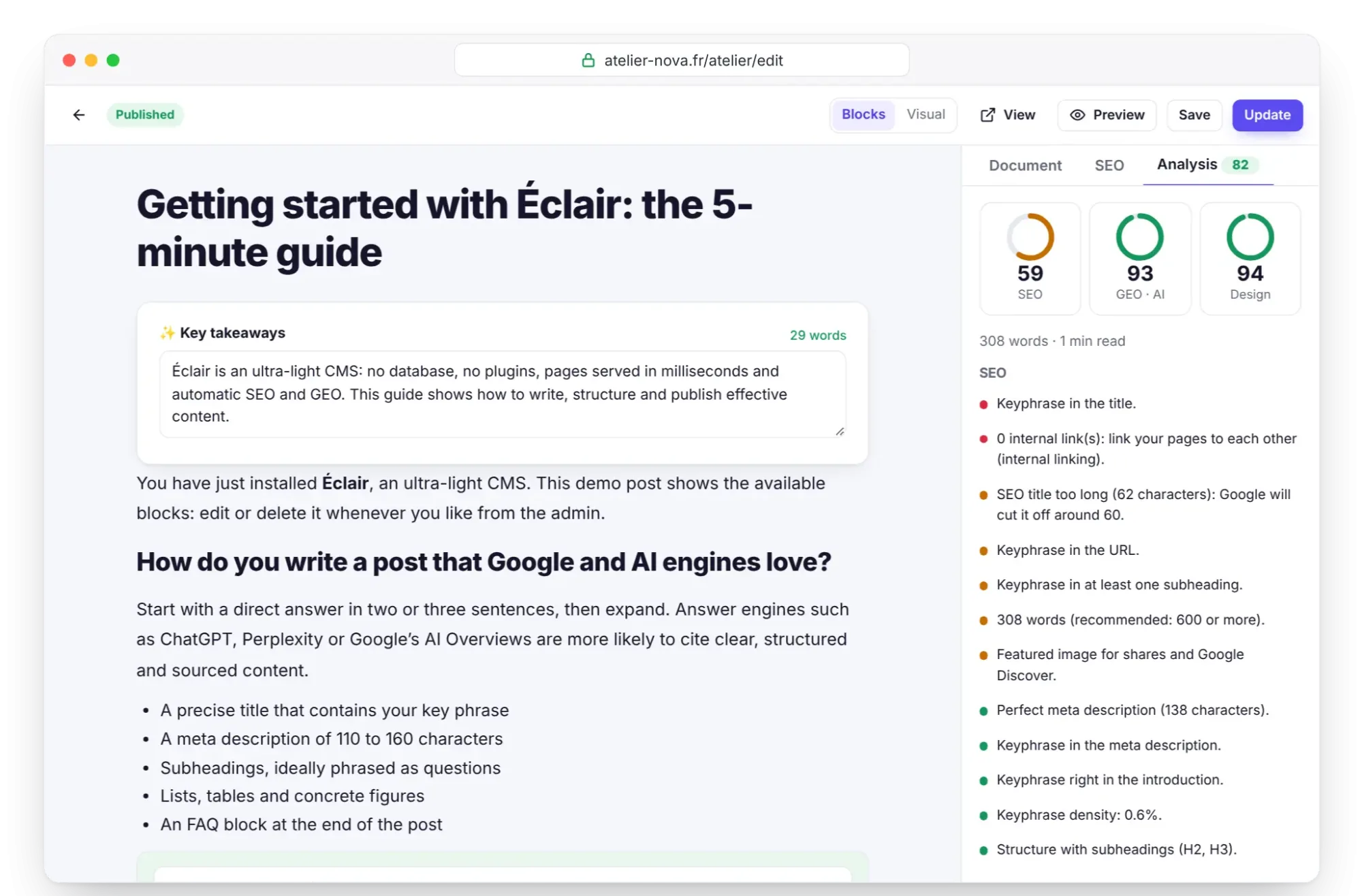
When you change the URL of published content, Éclair creates an automatic 301 redirect, marked “auto” in Redirects. The same happens when you change the URL of a category, the blog or the shop. Chains are avoided: if A leads to B and then B to C, A leads straight to C.
For a URL that no longer exists, such as an old page or a former WordPress site, add the redirect by hand:
- Open Redirects.
- In Add a redirect, enter the Old URL (
/stages-ete-2025) and the New URL (/stages). - Keep the 301 type (permanent, recommended), except for a temporary detour with 302, then click Add.
The Hits column counts redirected visits: handy for knowing when an old URL is no longer used.
Search Console, Bing and IndexNow
In Settings › SEO, the Webmaster tools section connects your site to search engines:
- Google Search Console: add a property of the URL prefix type, choose the HTML tag method, copy the tag and paste it into the field, and Éclair extracts the code. Then submit the
/sitemap.xmlURL in Search Console. - Bing Webmaster Tools: same principle, with the tag provided by Bing.
- IndexNow, off by default: turn it on to notify Bing, Yandex and the other compatible engines of each publication. Éclair publishes the required key file itself.
The same tab sets the site's identity for structured data. Atelier Nova chooses Local business (physical address), fills in its address and its opening hours in the suggested format (Tu-Sa 10:00-19:00), then its Social profiles, which link the site to its online identity. While you're building a site, uncheck Visible to search engines: everything is set to noindex. Remember to check this option again on launch day.
How do you reach 100 on each piece of content?
- Choose the keyphrase before writing: 2 to 4 words your customers actually type, such as “pottery classes in Lyon”. Enter it in the SEO tab.
- Place it in the page title and, if you fill it in, in the SEO title.
- Write a short introduction that contains it in the very first sentence.
- Structure the text with at least two H2 subheadings, one of which repeats the keyphrase.
- Reach the recommended length without padding: 600 words for a post.
- Add two internal links with
Ctrl+K, and alt text to every image. - Write a meta description of 110 to 160 characters with a concrete promise.
- Open the Analysis tab: fix the red items, then the orange ones, and publish.
After that, the dashboard shows the Average SEO score, the Average GEO (AI) score and the Priority improvements list: one visit a month is enough to stay on track.
Key points
- The technical foundation (sitemap, robots.txt, JSON-LD, redirects, canonical URLs) is automatic.
- An SEO title you enter replaces the whole title: leave it empty to get the automatic format.
- Aim for 30 to 60 characters for the title and 110 to 160 for the description.
- Changing a URL creates a 301 redirect, so there are no broken links.
- Fix the red items in the Analysis tab first, then follow the dashboard.
Going further
- GEO: getting cited by AI: the logical next step, for answer engines.
- Blog, categories and topic clusters: organizing internal linking across the whole site.
- Migrate from WordPress or Wix: taking over an old site without losing its rankings.
- Sources: Google Search Central's SEO Starter Guide and the official IndexNow website.
Frequently asked questions
Do I need a plugin for SEO with Éclair?
No. Sitemap, robots.txt, structured data, redirects and live analysis are built into Éclair's core. And there are no plugins to install anyway.
Why doesn't my SEO title show my site's name?
An SEO title entered by hand replaces the page's whole title. Leave the field empty to get the automatic format, or add your site's name at the end yourself.
What happens if I change the URL of a published page?
Éclair creates a 301 redirect from the old URL to the new one, visible in Redirects with the “auto” badge. Visitors and search engines land in the right place.
When will my site show up on Google?
Nobody can guarantee it: Google crawls pages at its own pace. Submit your sitemap in Search Console, turn on IndexNow for Bing and publish useful content regularly.
Can a noindex page get a good score?
No: the analysis marks noindex in red, because the page won't appear in Google. That's normal for a page you exclude on purpose, such as a thank-you page.