Understanding the MCP connector
Contents
- What is MCP, in simple terms?
- Built-in assistant or MCP connector: which should you choose?
- How does the MCP connector link your AI to your site?
- The connector's 6 tools
- Draft or suggestion: what does update_content do?
- What the AI can't do
- Security: who stays in control?
- What data goes to Anthropic or OpenAI?
- Technical details, for the curious
- Key points
- Going further
- Frequently asked questions
Éclair's MCP connector opens your site to Claude or ChatGPT, in their own app and with your subscription: they read your content, write drafts in your voice and prepare changes. No API key, no cost for the site. This lesson explains the idea without jargon, details the six tools, then covers everything the AI can't do.
What you'll be able to do
Explain MCP simply
The idea, a telling analogy and the four terms worth knowing.
Choose the right tool
Built-in assistant or MCP connector, depending on your budget and habits.
Know the safeguards
Explicit approval, short-lived tokens, limits and one-click revocation.
What is MCP, in simple terms?
MCP (Model Context Protocol) is an open standard that lets an AI application plug into tools and data. Anthropic released it as open source on November 25, 2024. Since December 2025, it has been entrusted to the Agentic AI Foundation, a fund within the Linux Foundation co-founded by Anthropic, Block and OpenAI.
Imagine you hire a very talented freelance writer: Claude or ChatGPT. The MCP connector is the badge you lend them for your office. With this badge, they can look through your files, drop drafts in your in-tray and slip suggested corrections onto the pages in your shop window. But they don't have the key to the shop window: you're the one who publishes. And you can take the badge back whenever you like, in one click.
“Standard” refers to the shape of the badge: the same reader accepts Claude, ChatGPT or any other compatible tool. Four terms are all you need for what follows:
- MCP client: the AI application (Claude, ChatGPT…)
- MCP server: your site, which answers at the
/_eclair/mcpaddress - tool: an action your site offers the AI, such as reading content or creating a draft
- OAuth: the standard procedure through which you give your approval, without ever handing your password to the AI
Built-in assistant or MCP connector: which should you choose?
Both share the same editorial profile, the same writing rules and the same things to avoid.
| Built-in assistant | MCP connector | |
|---|---|---|
| Where you work | In Éclair's admin | In the Claude or ChatGPT app |
| Who pays | Your API key, per use: ≈ $0.12 per article with Claude Sonnet 5.5 (prices as of October 29, 2026) | Your subscription; no cost for the site |
| Setup | API key, model and budget | A switch and a URL to paste |
| Generated images | Yes, with an image generator set up | No: images from your media library only |
| Touch-ups in the editor | Yes | No: its suggestions open in the editor |
| Limits | Monthly budget, 60 requests per person per day | 60 changes per hour per connection |
Keep the assistant for quick touch-ups in the editor, and the connector for long working sessions in Claude or ChatGPT. The connector needs no key: the assistant's provider can stay set to Off (see Turn on the built-in AI assistant).
How does the MCP connector link your AI to your site?

- You turn on Allow MCP connections in Settings › AI assistant, then click Save. The Connector URL appears:
https://example.com/_eclair/mcp. - You paste this URL into Claude or ChatGPT.
- The app registers automatically with your site, which gives it a signed identifier without storing anything.
- A page on your site opens: you log in (two-factor authentication included), check the app and its return URL, then click Allow.
- The app receives an access token valid for one hour, renewed automatically.
- With each request, the AI calls your site's tools, and your site returns your data or creates the requested draft.
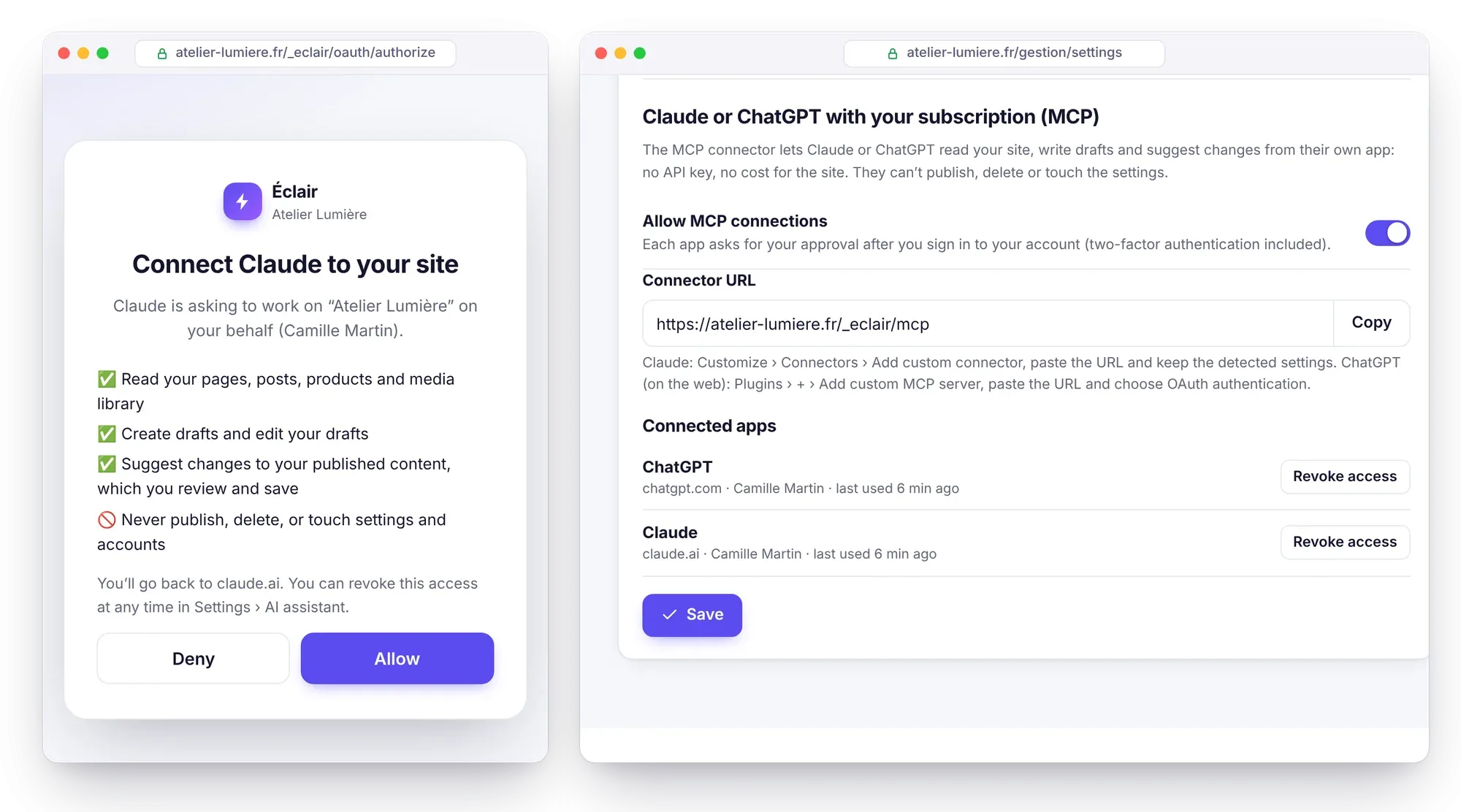
The approval page lists what the app will be able to do: read your pages, posts, products and media library; create and edit drafts; suggest changes to your published content. And what it will never do: publish, delete, or touch the settings and accounts.
The connector's 6 tools
The connector offers six tools: four for reading, two for writing. The AI starts with get_site, which gives it the site map and its writing rules.
| Tool | Role | Parameters | Type |
|---|---|---|---|
get_site | Inventory (up to 60 pages, 40 recent posts and 40 products, with their IDs), categories, editorial profile, SEO, GEO and Markdown rules | none | read |
search_content | Searches titles and text by keyword; without keywords, lists recent content (15 at most) | query, type (any, post, page, product) | read |
get_content | Reads a piece of content: metadata and text in Markdown (24,000 characters at most) | id | read |
find_media | Searches the media library for an image by name or description (12 at most) | query | read |
create_draft | Creates a post, a page or a product page as a draft, in Markdown or in sections | type and title required; body, sections, summary, keyword, seo_title, seo_description, slug, category, image, faq, team, lang, product | write |
update_content | Edits a draft, or prepares a suggestion for published content | id and note required; title, summary, keyword, seo_title, seo_description, image, replace, append, after_heading, faq, team_member, product | write |
The product type and the product parameter (price, availability, payment link, variants…) only exist if your shop is open. The sections of create_draft mirror the editor's blocks: banner, features, subheading, paragraph, list, callout, FAQ, button, team, contact and latest posts, plus products if your shop is open and image if your media library has images.
Each draft comes back with its SEO and GEO scores out of 100, its main weak points and two links: edit_url to open it in Éclair, preview_url for the preview. A suggestion comes back with review_url.
Draft or suggestion: what does update_content do?
- A draft is edited directly; its previous version stays in the Version history.
- Published or scheduled content doesn't change:
review_urlopens the editor with the change applied and the message “Change suggested by the AI: review it, then save to apply it.” You save, or you close it and nothing changes. - An outdated suggestion, because the content changed in the meantime, is refused. A forgotten suggestion may be deleted after 14 days.
To rewrite a passage (replace), the AI copies the exact text it read with get_content. This works in paragraphs, subheadings, quotes, callouts, lists, FAQ answers, features and team bios, but not in the banner, buttons or tables.
What the AI can't do
These limits are written into Éclair's code, not just into its instructions: the corresponding tools don't exist, so even a booby-trapped page can't trigger them. Through the connector, the AI can't:
- publish, schedule or unpublish content
- delete anything
- change the settings, menus, redirects or accounts
- link translations together (the editor's Translation of… field)
- create images, or upload any to the media library: it only uses the ones already there
- change the URL, category or language of existing content
- read the messages received through your contact form
Security: who stays in control?
- Off by default: as long as the switch is off, the connector's URLs return a 404 page.
- Explicit approval: you log in to your account, two-factor authentication included, then click Allow. If you logged in more than 15 minutes ago, you're asked for your password again. The page never shows your admin URL.
- Identified apps: Claude and ChatGPT are recognized by their exact return URL. Any other app is shown by its address, with the warning “Unknown app: only accept if you just added it yourself.”
- Short-lived tokens: an access token lasts one hour, then it's replaced. After 60 days without use, you have to give your approval again. A refresh token that has already been replaced and is presented again cuts off the connection. Only the tokens' hashes are stored, outside backups.
- Limits: 5 connections per person and 50 for the site, with the least used ones removed first; 60 changes per hour per connection, to prevent loops.
- Same permissions as the assistant: an editor only has access if “Editors can use the assistant” is checked.
- Revocation: a Revoke access button for each app in Settings › AI assistant. Turning off the connector cuts off everything; changing your password or logging out all your devices cuts off your own connections.
- Traceability: approvals and revocations appear in the Security log (
mcp_authorized,mcp_revoked).
What data goes to Anthropic or OpenAI?
The connector sends what the AI reads in order to answer you: the site inventory, your name and role, the editorial profile, the writing rules and the text of the content it opens. This data is processed under the terms of your Claude or ChatGPT subscription. No passwords, API keys or contact form messages ever leave your site.
Technical details, for the curious
The MCP server and its authorization fit in under 25 KB of PHP, with no dependencies:
- Transport: stateless “Streamable HTTP”. Each JSON-RPC message is sent as a
POSTto/_eclair/mcpand gets a JSON response; aGETgets a 405 response. At most 20 messages per batch and 1 MB per request. - Protocol versions: 2025-11-25, 2025-06-18 and 2025-03-26. The specification is now at revision 2026-07-28, which removes sessions and deprecates dynamic registration, still accepted for compatibility.
- Discovery:
/.well-known/oauth-protected-resource(RFC 9728),/.well-known/oauth-authorization-server(RFC 8414) and/.well-known/openid-configuration. Without a token, the endpoint answers 401 with aWWW-Authenticateheader that points to them. - Authorization: OAuth 2.1, PKCE
S256required, public client,eclairscope,issparameter returned (RFC 9207). - Dynamic registration (RFC 7591) without storage: the identifier contains the app's name and its return URLs, signed by the site. One to five URLs, in
https://, or inhttp://on the loopback (localhost,127.0.0.1), where the port may vary. - Annotations: the four read tools carry
readOnlyHint: true; no tool is destructive. MCP Inspector can query the server (see Local development and testing).
An excerpt from the /.well-known/oauth-authorization-server response:
{
  "issuer": "https://example.com",
  "authorization_endpoint": "https://example.com/_eclair/oauth/authorize",
  "token_endpoint": "https://example.com/_eclair/oauth/token",
  "registration_endpoint": "https://example.com/_eclair/oauth/register",
  "code_challenge_methods_supported": ["S256"],
  "authorization_response_iss_parameter_supported": true
}
Key points
- MCP is an open standard, released by Anthropic in November 2024, that connects an AI to tools.
- The MCP connector puts Claude or ChatGPT to work with your subscription, with no API key and no cost for the site.
- Six tools: four for reading, plus
create_draftandupdate_contentto write drafts or suggestions. - No publishing, deleting, settings changes, generated images or linking of translations, ever.
- Off by default, explicit approval, one-hour tokens, access revoked in one click.
Going further
- Connect Claude to your site: the complete step-by-step guide, plans and troubleshooting included.
- Connect ChatGPT to your site: plugins, OAuth and workspaces.
- 40 MCP use cases, with prompts: ready-to-copy requests, sorted by need.
- Advanced security and maintenance: revoking access and monitoring your site.
- Official sources: Anthropic's announcement of the Model Context Protocol and MCP specification versions.
Frequently asked questions
Does the MCP connector cost anything?
Can Claude or ChatGPT publish on my behalf?
No. They create drafts and prepare suggestions; publishing remains a click in Éclair. The connector contains no publishing tool.
Do I need to turn on the built-in assistant to use the connector?
No. The Allow MCP connections switch is enough. Still, fill in your editorial profile in Settings › AI assistant: it's passed to the AI through get_site.
What happens if I change my password?
All your MCP connections are cut off. You'll need to reconnect Claude or ChatGPT and give your approval again on your site's page.