Advanced AI workflows
Contents
- Give every conversation your site's context
- Advanced AI workflows: the weekly routine
- What review checklist should you use before publishing?
- Version history and rolling back
- Agencies: one connector per client site
- Combine your site with other connectors
- Security hygiene, every month
- The limits to know
- API key or subscription: what does each option cost?
- Key points
- Going further
- Frequently asked questions
Advanced AI workflows turn the MCP connector and the built-in assistant into a working method: a routine every week, a human review before each publication, and access kept under control. This lesson brings together the practices that hold up over time, for a single site as well as for an agency with many clients, with the real cost of each option.
What you'll be able to do
Keep up a routine
A typical week, from the editorial plan to publication.
Review like a pro
A checklist to run before each publication.
Keep access tidy
Agencies, multiple sites and revoking access without forgetting anyone.
Give every conversation your site's context
The context that matters most is already in Éclair: your editorial profile (Settings › AI assistant) and the SEO and GEO writing rules, sent to the AI every time it calls get_site. Polish this profile rather than repeating your instructions: audience, tone, values, concrete rules (“always link to the contact page”) and image style.
If you organize your work in Claude projects, note one detail: on Team and Enterprise plans, connectors are only available there in private projects. For individual plans, Claude's help center doesn't yet say whether connectors work in a project's conversations (checked on November 1, 2026): check in your account, with + › Connectors from a conversation in the project.
Either way, keep a starter prompt at hand:
Use the connector for my site [site name]. Start with get_site and strictly follow my editorial profile and its writing rules. Before writing about a topic, check with search_content that it doesn't already exist. For published content, group all the changes into a single suggestion, and always give me the link to review it.Advanced AI workflows: the weekly routine
A short, regular routine beats one big session a month. Here's a typical week for a site that publishes one or two articles a week; the times are indicative.
| Day | Step | With what | Time |
|---|---|---|---|
| Monday | Plan: review the site and pick 2 or 3 topics | Claude or ChatGPT, read tools | 15 min |
| Tuesday | Write 1 or 2 drafts | create_draft | 15 min |
| Wednesday | Review, fill in the [To complete: …] placeholders, check the facts | Éclair's editor, Analysis tab | 30 min |
| Thursday | Improve older content: SEO, GEO, internal links | update_content, as a suggestion | 15 min |
| Friday | Publish or schedule, link translations | Éclair, by hand | 10 min |
Monday's prompt:
Give me this week's review of my site: pending drafts, remaining [To complete: …] placeholders and 3 topics to write about this week, with no overlap with existing content. Don't create anything for now.For the Tuesday and Thursday steps, pick from the 40 MCP use cases.
What review checklist should you use before publishing?
The AI prepares, and only you publish. Before each click on Publish, run through this checklist:
| What to check | Where | Why |
|---|---|---|
| Facts: prices, opening hours, names, figures | The text, line by line | The AI shouldn't make anything up, but it can get things wrong |
| [To complete: …] placeholders | Analysis tab | None should remain |
| Internal and external links | Preview, opening each link | A wrong URL or a dubious source costs you credibility |
| Health, law, tax, finance | The text | The AI should stay general and refer readers to a professional |
| Tone and promises | Reading aloud | The editorial profile doesn't replace your ear |
| SEO, GEO and Design scores | Analysis tab | Aim high, without sacrificing clarity |
| SEO title, meta description, URL | SEO tab | This is what people see first in search results |
| Featured image, alt texts | Editor | Accessibility and sharing on social media |
| Translations | Translation of… field | The AI never links the versions |
For a suggestion, the review is shorter: read the editor's message, compare with the preview, then save, or close without saving.
Version history and rolling back
Whatever the AI does is easy to undo. A draft edited through the connector is saved, and its previous version goes into the editor's Version history, which keeps the last 20. A suggestion writes nothing until you save: the message “Change suggested by the AI: review it, then save to apply it.” also offers Cancel. Once saved, the history takes you back to the previous version.
Agencies: one connector per client site
Each Éclair site has its own /_eclair/mcp URL. A few rules prevent any mix-ups:
- One connector per client, with an explicit name, for example “Client · Martin Bakery”.
- A single active connector per conversation: all Éclair sites offer the same tool names (
get_site,create_draft…). In Claude, turn on only the right site in + › Connectors; in ChatGPT, call the right plugin with@. - The right site at approval time: the approval page shows the site's name; check it before clicking Allow.
- One account per person: each team member logs in with their own Éclair account, often an editor account. Drafts carry their name and access can be revoked one person at a time; each person keeps at most 5 connections per site.
- The right plans: Claude Free is limited to one custom connector. On Claude Team and Enterprise, an owner adds the connectors, members click Connect and owners set the per-tool permissions. In ChatGPT Business, Enterprise and Edu, admins create and publish the workspace's plugins.
- A clean end of contract: revoke the agency's access in Connected apps, then delete the accounts that are no longer needed.
How to organize a whole agency is covered in Scaling Éclair in an agency.
Combine your site with other connectors
If other services are already linked to Claude or ChatGPT, a single conversation can bring them together: read a meeting report in your documents, then prepare the article in Éclair.
Read the meeting report [document name] in my documents, then create a draft article on my site that covers only the public announcements, with no internal information. Tell me what you deliberately left out.Three precautions: turn on only the connectors you need (beyond 10, Claude recommends the On demand mode in Tool access); keep update_content on Needs approval, because a document read elsewhere may contain booby-trapped instructions; check where each fact taken from another source comes from.
Security hygiene, every month
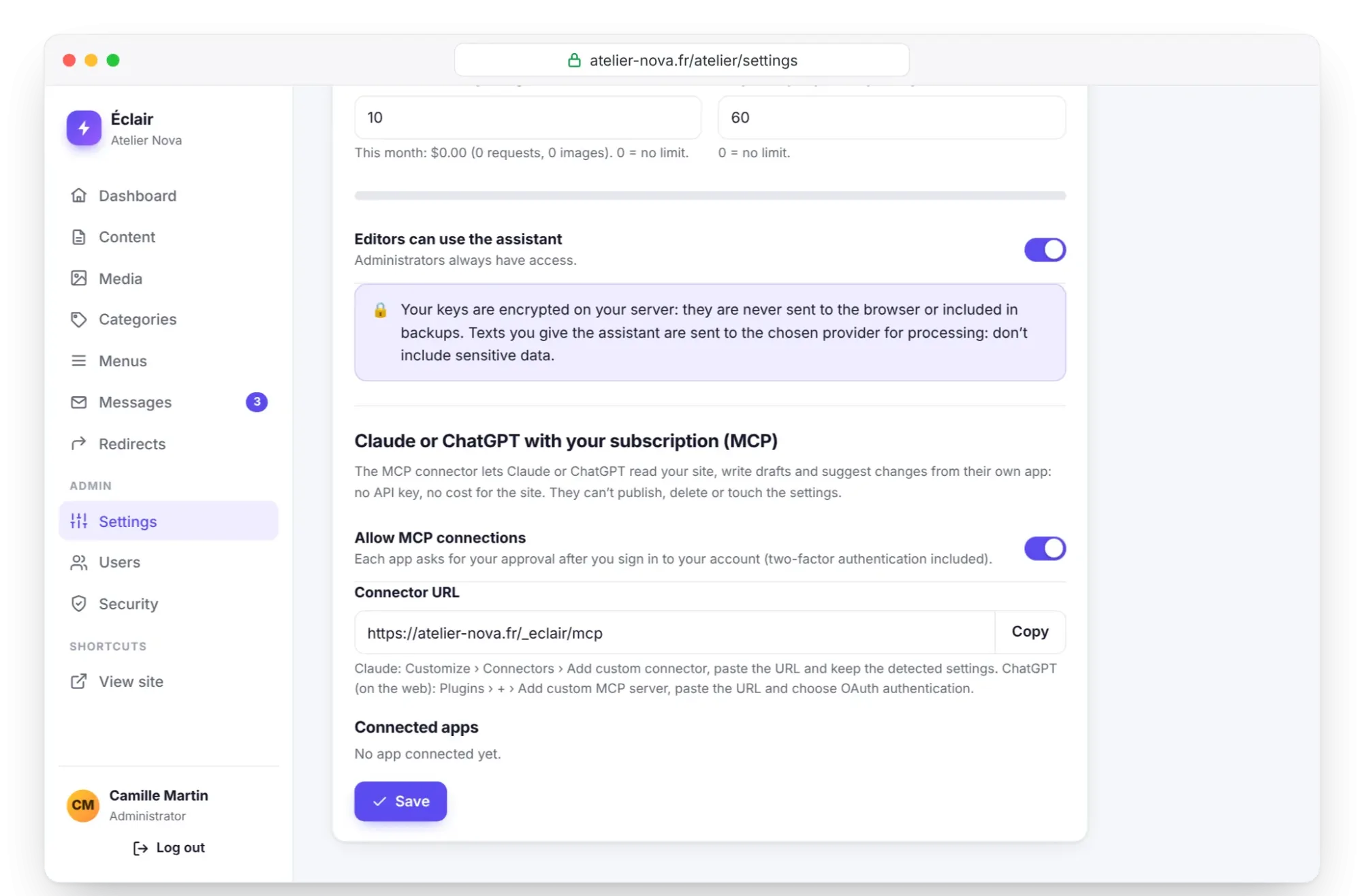
- In Settings › AI assistant, in the Connected apps list, revoke any connection you don't recognize or haven't used for a long time.
- In the Security log on the Security page, look for approvals (
mcp_authorized) and revocations (mcp_revoked). - Keep two-factor authentication on every account that connects (see Everyday security).
- Turn off Allow MCP connections if nobody uses it: the connector's URLs disappear.
- Deny any “Unknown app” you didn't start yourself.
- When a team member leaves, delete their account: their connections go with it.
The limits to know
| Limit | Value | In practice |
|---|---|---|
| Changes per connection | 60 per hour | Beyond that, the AI gets a refusal and should let you know |
get_site inventory | 60 pages, 40 recent posts, 40 products | On a large site, the AI fills in the rest with search_content |
Text read by get_content | 24,000 characters | The end of very long content isn't read |
| Passages rewritten per call | 30 | Split up large corrections |
| Connections | 5 per person, 50 per site | The least used ones are removed |
| Approval | One-hour token, 60 days without use at most | After that, you need to give your approval again |
API key or subscription: what does each option cost?
The built-in assistant is paid per use, on your API key. The MCP connector costs the site nothing, but requires a compatible subscription. Here's an example for 20 articles a month, based on the prices taken on October 29, 2026 by the official guide:
| Option | Cost for 20 articles | Note |
|---|---|---|
| Assistant, Claude Haiku 5.5 | under $0.20 | Fast and affordable model |
| Assistant, Claude Sonnet 5.5 | ≈ $2.40 | The right balance to start with |
| Assistant, Claude Opus 5.5 | ≈ $4.80 | The most capable model |
| Assistant images | ≈ $1 | One featured image per article, ≈ $0.05 each |
| MCP connector | $0 for the site | Your Claude or ChatGPT subscription does the work |
On the subscription side, claude.com/pricing lists Claude Free at $0 (a single custom connector), Max at $100 and Ultra at $200 a month; on ChatGPT, writing requires a Business, Enterprise or Edu plan (checked on November 1, 2026).
If you already pay for Claude or ChatGPT for other things, the connector costs you nothing more. Otherwise, going by the example above, a few dollars of API usage a month are enough for a small site, with a budget capped in Éclair ($10 by default). Nothing stops you from using both: the assistant for touch-ups and images, the connector for long sessions.
Key points
- Advanced AI workflows rely on a carefully written editorial profile, sent with every
get_sitecall. - A short weekly routine (plan, write, review, improve, publish) beats one big monthly session.
- The review checklist comes before every publication: facts, placeholders, links, tone, translations.
- In an agency: one connector per client, one account per person, access revoked when a contract ends.
- The API is paid per use and the connector relies on a subscription: you can combine the two.
Going further
- 40 MCP use cases, with prompts: the requests to fit into your routine.
- Scaling Éclair in an agency: production, maintenance and client training.
- Advanced security and maintenance: monitoring, updates and revoking MCP access.
- Turn on the built-in AI assistant: key, budget and editorial profile.
- Official sources: Claude help on connectors and Claude API pricing.
Frequently asked questions
Do you need a Claude project to work on your site?
No. The essential context (editorial profile and writing rules) arrives with get_site in any conversation. A project can help you organize your work; on Team and Enterprise, connectors are only available in private projects.
How much time should you spend on the site each week?
For one or two articles a week, the suggested routine takes about 1 hour 25 minutes, review included. Wednesday's review is the step you should never skip.
Can an agency manage all its clients from a single Claude account?
Yes, with one connector per site and a paid plan, since Free is limited to one custom connector. Turn on only one connector per conversation so you don't mix up sites.
What happens if the AI goes over 60 changes in an hour?
Éclair refuses any further write actions on that connection, and the AI should let you know. Reads remain possible; pick up again a little later.