Install Éclair on Webempresa
Contents
- The plan and control panel at a glance
- First of all: allow your country
- Step 1: choose PHP 8.3
- Step 2: check the HTTPS certificate
- Step 3: prepare the domain's folder
- Step 4: upload Éclair's files
- Step 5: run the setup wizard
- Step 6: check after installation
- Pitfalls specific to Webempresa
- Install Éclair on Webempresa: what if something goes wrong?
- Key points
- Going further
- Frequently asked questions
If you install Éclair on Webempresa, a Spanish web host, from outside the Spanish-speaking world, expect a surprise: by default, WePanel, webmail and FTP refuse connections from non-Spanish-speaking countries. Once your country is allowed, everything happens in WePanel, the in-house control panel: PHP 8.3, a free certificate, then uploading the files to your domain's folder. Allow 30 minutes.
The plan and control panel at a glance
| Item | At Webempresa |
|---|---|
| Control panel | WePanel, the in-house control panel, which has replaced cPanel since November 2021 |
| Web server | Apache + Nginx + Varnish; mod_rewrite on |
| PHP version | 8.2, 8.3, 8.4 and 8.5, set per domain |
| Public folder | public_html/your-domain |
| ZIP extraction | Not documented in the file manager: upload the files over FTP |
| Outgoing connections | Not documented: test them |
| Price checked on November 1, 2026 | Plan Micro: €35 excl. VAT/year (€2.92/month) instead of €70 excl. VAT/year (Webempresa pricing, in Spanish) |
These euro prices come from Webempresa's Spanish pricing page, which states “Los precios no incluyen impuestos”: prices exclude taxes. The page doesn't say whether the discount applies to the first year only. Plan Mini, designed for 2 sites, was listed at €14.20 excl. VAT/year instead of €142 excl. VAT/year, a 90% discount.
First of all: allow your country
Webempresa blocks IP addresses from non-Spanish-speaking countries by default on WePanel, webmail, FTP and the WordPress and Joomla admin areas. From a country such as the United Kingdom, Germany or France, start here:
- In your customer area, open Hosting, then Gestionar seguridad (Manage security).
- Go to Accesos Web (Web access).
- Add your country for admin access and for FTP, then save.
You can also open WePanel from the customer area with the service's Acceder al panel (Access the panel) button, or at http://your-domain.com/wepanel.
Step 1: choose PHP 8.3
- In WePanel, in the Herramientas (Tools) section, open Versiones PHP (PHP versions).
- Click the button next to your domain, then Modificar Versión de PHP (Change PHP version).
- Choose 8.3, then click Actualizar versión PHP (Update PHP version).
A domain set to Heredado (Inherited) follows the system version, which you change with Actualizar Versión PHP del Sistema (Update the system PHP version). Settings such as memory_limit are under Herramientas, then Parámetros PHP (PHP parameters) and Opciones de PHP (PHP options).
Step 2: check the HTTPS certificate
Webempresa normally activates a free certificate on its own, from Let's Encrypt or ZeroSSL. Open https://your-domain.com: if the padlock is missing, go to WePanel, the Seguridad (Security) section, then SSL / TLS.
No WePanel option to force HTTPS is documented. Let Éclair handle it: if you run the wizard over https://, it checks Force HTTPS on its own, then redirects every visit to the official address once that address is verified.
Step 3: prepare the domain's folder
Each domain has its own folder in public_html, for example public_html/atelier-nova.fr. The account's main domain is only a temporary address pointing to public_html itself: don't install Éclair there. Webempresa doesn't document a default page; still, open your domain's folder and move any old index.html to a backup folder.
Step 4: upload Éclair's files
- In WePanel, in the Archivos (Files) section, open Cuentas FTP (FTP accounts), then click the account's icon and Detalles de Acceso (Access details). The default FTP username is your WePanel username, and the host is the server's IP address.
- In FileZilla, enter the Host, Username and Password, then click Quickconnect.
- Turn on Server › Force showing hidden files.
- On the right, open
public_html/your-domain. On the left, open theeclairfolder and select all of its contents. - Drag the selection to the right, then check that
.htaccesshas arrived.
WePanel's Gestor de archivos (File manager) can upload files, but Webempresa's help doesn't say whether it extracts archives. FTP therefore remains the safe route.

Step 5: run the setup wizard
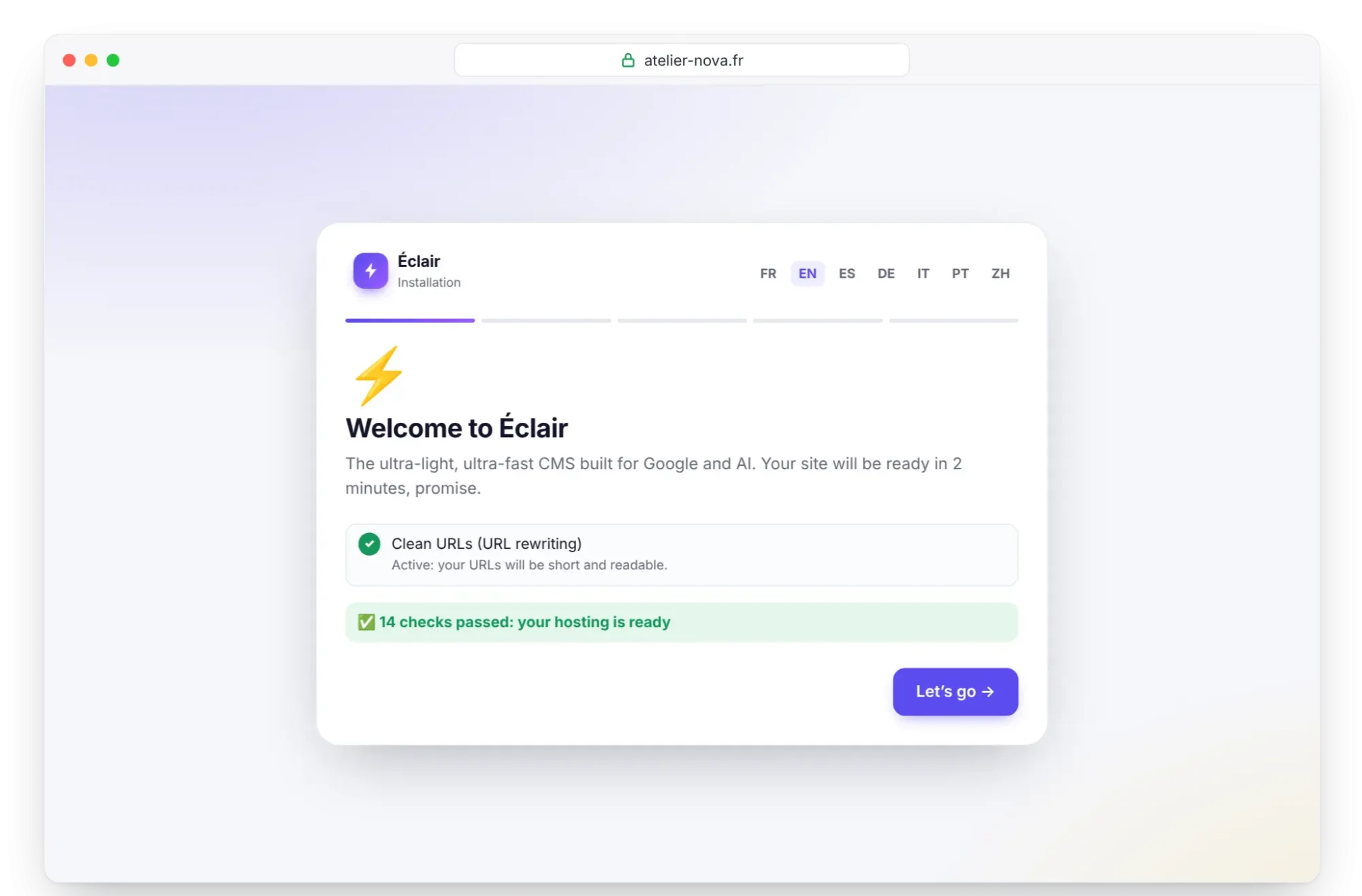
Open https://your-domain.com. Éclair's wizard checks the server: PHP 8.3, extensions, write permissions, HTTPS and “Clean URLs (URL rewriting)”, which must say “Active”. It's available in English and Spanish, among other languages, chosen at the top of the screen. Click Let's go, then follow Install Éclair step by step, within 2 hours.
Step 6: check after installation
- Log in to the admin from your country. If access fails while the public site displays, check your Accesos Web (Web access) settings: whether admin areas other than WordPress or Joomla are protected isn't documented.
- On the Security page, check “Encrypted connection (HTTPS) enforced” and “Site address verified”; if needed, click Verify the site address.
- The “Folder protection test” must show Protected everywhere.
- For the AI assistant, click Test the connection in Settings › AI assistant: the outgoing rules aren't documented.
Pitfalls specific to Webempresa
- Geo-blocking of WePanel, webmail, FTP and the WordPress and Joomla admin areas: it's the first cause of failure from a non-Spanish-speaking country.
- The right folder:
public_html/your-domain, notpublic_html. - SSH, available only on some plans, on request, after you register your IP address.
- Several security layers: Mod Security with anti-hacking rules designed for WordPress, Imunify360, a Firewall de dominios (domain firewall) and Seguridad CMS (CMS security). Report a 403 error in Éclair's admin to support.
- Figures to double-check: the Plan Micro page states 5 GB of space in its summary and 2.5 GB NVMe in the details, with 100,000 inodes.
Install Éclair on Webempresa: what if something goes wrong?
| Problem | Cause | Solution |
|---|---|---|
| WePanel or FTP refuses the connection | Country not allowed | Add it in Gestionar seguridad › Accesos Web (Manage security › Web access) |
| The site doesn't appear at the domain's address | Files uploaded to public_html | Move them to public_html/your-domain |
| 404 error on every page except the home page | .htaccess not uploaded | Force hidden files to show and upload it again |
| 403 error when saving content | Mod Security or Imunify360 | Contact support with the URL and the time |
| “Can't reach Claude (Anthropic)…” | Outgoing connection blocked | Ask support to open it, or use the MCP connector |
The Troubleshooting page covers Éclair's other messages.
Key points
- From a non-Spanish-speaking country, first allow your country in Accesos Web (Web access).
- Choose PHP 8.3 in Herramientas › Versiones PHP (Tools › PHP versions).
- Upload the contents of the
eclairfolder topublic_html/your-domain, hidden files included. - Run the wizard over
https://: Éclair then forces HTTPS itself.
Going further
- Prepare your installation, Install Éclair step by step and Essential settings before launch.
- Turn on the built-in AI assistant and Understanding the MCP connector.
- Choosing your hosting to compare, and the universal FTP method.
- Webempresa's official help, in Spanish: access from non-Spanish-speaking countries, change the PHP version and FTP access details.
Frequently asked questions
Why does WePanel refuse my connection?
Webempresa blocks non-Spanish-speaking countries by default on WePanel, webmail and FTP. From your customer area, add your country under Gestionar seguridad (Manage security), then Accesos Web (Web access).
Which Webempresa plan should I choose for Éclair?
Plan Micro is enough for one site: €35 excl. VAT/year instead of €70 excl. VAT, as of November 1, 2026. Plan Mini hosts 2 sites; in both cases, check the renewal price.
Where is my data hosted?
In the data center of your choice: in Europe or in the United States.
Does Webempresa back up my site?
Yes, with SuperBackup: 30 days of backups and 12 monthly copies, plus a weekly copy and a replica every 4 hours.