Install Éclair on o2switch
Contents
- The plan and control panel at a glance
- Step 1: choose PHP 8.3
- Step 2: turn on the HTTPS certificate
- Step 3: empty the public folder
- Step 4: upload Éclair's files
- Step 5: run the setup wizard
- Step 6: check after installation
- Pitfalls specific to o2switch
- Install Éclair on o2switch: what if something goes wrong?
- Key points
- Going further
- Frequently asked questions
You can install Éclair on o2switch in half an hour, certificate included. o2switch's cPanel has everything you need, except for two settings: the PHP version, left at 8.1 by default, and HTTPS, which no checkbox enforces. This guide follows each screen, from Select PHP Version to the final checks, then details the pitfalls specific to this web host.
The plan and control panel at a glance
| Item | At o2switch |
|---|---|
| Control panel | cPanel, with in-house tools (TigerProtect, LSCache…) |
| Web server | “Serveur Web PowerBoost” (PowerBoost web server) behind a “Load-Balancer LiteSpeed Web ADC”; .htaccess and URL rewriting supported |
| PHP version | 8.1 by default (native version); 8.3, 8.4 and 8.5 available |
| Public folder | public_html (www is only a shortcut to it) |
| ZIP extraction | Yes, in the File Manager |
| Outgoing connections | Strict firewall, port 443 not documented: test it |
| Price checked on November 1, 2026 | Grow: €7.00 excl. VAT/month, i.e. €84.00 excl. VAT a year, no promotion (o2switch pricing, in French) |
These prices are in euros, as shown on o2switch's French site, and exclude VAT: the price including VAT is calculated at checkout based on your country. Cloud goes from €1.86 excl. VAT/month in the first year to €16.00 excl. VAT/month afterwards, and Pro from €6.25 to €24.00 excl. VAT/month.
Step 1: choose PHP 8.3
- Log in to cPanel with the credentials from the welcome email, for example at
https://your-domain.com:2083. If port 2083 is blocked on your network, usehttps://cpanel.your-domain.cominstead. - In the Software section, open Select PHP Version.
- Choose 8.3 in the drop-down list, then click Apply.
- Check that the current version now shows 8.3.
Why this setting? Éclair works from PHP 8.1, but its wizard will advise you to switch to 8.3, and the Security page won't tick the “Supported PHP version” line. If a module is missing, the Extension tab of the same tool turns it on.
Step 2: turn on the HTTPS certificate
- In cPanel's Security section, open the Let's Encrypt tool.
- Click Générer (Generate) next to your domain.
- Untick the names ending in
.odns.fror.o2switch.netand the subdomains that don't point to o2switch, then confirm. - Open
https://your-domain.com: the padlock should appear.
o2switch has no checkbox to force HTTPS, and you don't need one: Éclair enforces it itself. When you run the wizard over https://, it ticks Force HTTPS; once the site address is verified, every visit is also redirected to the official address. For a server-side rule, once step 4 is done, paste o2switch's official code at the top of Éclair's .htaccess, and add it back after each update.
RewriteEngine On
RewriteCond %{HTTP:X-Forwarded-Proto} !https
RewriteCond %{HTTPS} !on
RewriteRule ^(.*) https://%{HTTP_HOST}%{REQUEST_URI} [L,R=301]
Step 3: empty the public folder
o2switch doesn't document any placeholder page. Open public_html anyway. An old site or a forgotten index.html file could load instead of Éclair: move it to a backup folder. Leave the .well-known folder in place if there is one, as it's used for certificates.
Step 4: upload Éclair's files
The File Manager extracts archives. o2switch recommends it for small folders, and Éclair's 480 KB archive is one.
- In cPanel's Files section, open File Manager.
- Click Settings, at the top right, and turn on the display of hidden files.
- Open
public_html, upload theeclair-cms-1.8.0.ziparchive, then extract it. - Open the resulting
eclairfolder, select all of its contents,.htaccessincluded, and move them topublic_html. - Delete the empty
eclairfolder, the archive and the three.txtfiles that come with it.
Prefer FileZilla? The main FTP account uses the same username and password as cPanel. Upload the contents of the eclair folder to public_html, then turn on Server › Force showing hidden files to check that .htaccess has arrived. SFTP uses port 22, once your IP address is allowed in Autorisation SSH (SSH authorization).

Step 5: run the setup wizard
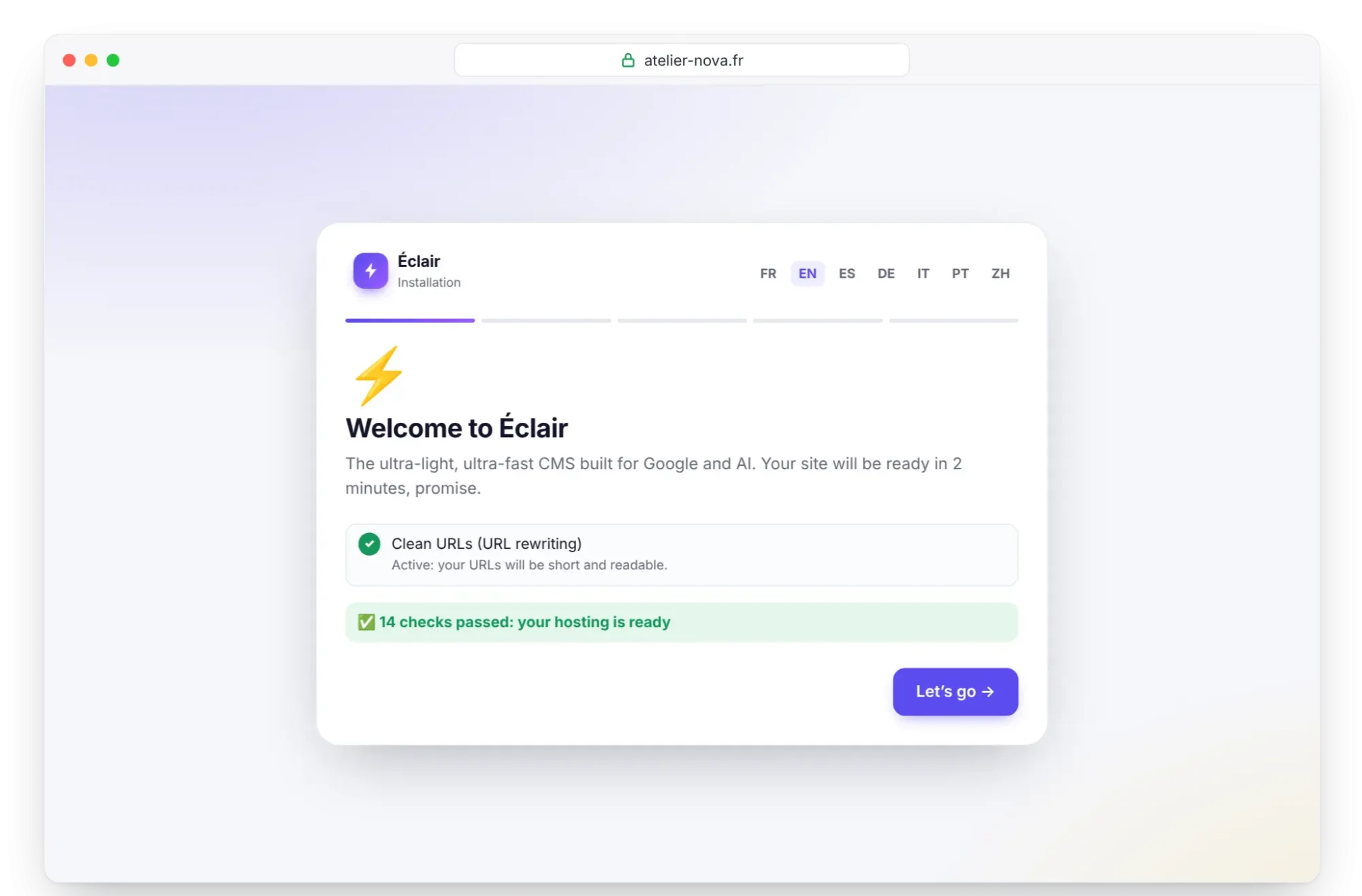
Open https://your-domain.com, making sure you use https://: the wizard starts. Its first screen checks the server; the “Clean URLs (URL rewriting)” line must show “Active”. Click Let's go, then answer the 4 questions detailed in Install Éclair step by step. You have 2 hours from this first visit.
Step 6: check after installation
- In the admin, open Security. The “Encrypted connection (HTTPS) enforced”, “Site address verified” and “Supported PHP version” lines must be ticked.
- If the address isn't verified, click Verify the site address.
- In the “Folder protection test”, every file must show Protected.
- For the AI assistant, paste your key in Settings › AI assistant, then click Test the connection. “Connection successful” proves that your server can reach the provider.
Pitfalls specific to o2switch
- PHP 8.1 by default: without step 1, your site stays on the native version.
- A strict outgoing firewall: 5 exceptions at most, only for SSH (port 22), MongoDB (ports 27017 to 27019) and port 8888. o2switch states that no other port can be opened, even through support, apart from widely used services such as GitHub. Port 443 isn't documented: test it.
- TigerProtect and Mod Security filter requests. Their rule against direct access to
.phpfiles shouldn't bother Éclair, which only goes throughindex.php. - A load balancer in front of the server: hence the
X-Forwarded-Protoheader in o2switch's official code. Éclair reads it too, as well asX-Forwarded-SSL, and recognizes HTTPS without any redirect loop. - File limits: 500,000 inodes per hosting account and 20,000 files per folder, according to o2switch's 2019 terms of sale. Éclair stores its images in monthly folders, which keeps it far from the second limit.
Install Éclair on o2switch: what if something goes wrong?
| Problem | Cause | Solution |
|---|---|---|
| Orange item “Works, but switch to PHP 8.3 or later…” | Native version 8.1 kept | Select PHP Version, 8.3, Apply, then reload |
| 404 error on every page except the home page | .htaccess not uploaded | Show hidden files through Settings and upload it again |
| 403, 406 or 429 error after saving | TigerProtect or Mod Security rule | Turn off Mod Security on the domain to test, then the Règles de sécurité par défaut (default security rules), or write to support with the URL |
| “Can't reach Claude (Anthropic)…” | Outgoing connection blocked | Ask support whether the provider's address can be allowed, or use the MCP connector |
| Redirect loop | HTTPS rule without X-Forwarded-Proto | Replace it with o2switch's official code, or delete it |
Key points
- Switch from PHP 8.1 to 8.3 in Select PHP Version before anything else.
- Generate the Let's Encrypt certificate, then run the wizard over
https://: Éclair then forces HTTPS itself. - Upload the contents of the
eclairfolder topublic_html, hidden files included. - Test outgoing connections before relying on the AI assistant.
Going further
- Prepare your installation: the checklist before you upload a single file.
- Install Éclair step by step and Troubleshooting: the wizard's screens and the known errors.
- Essential settings before launch and Turn on the built-in AI assistant.
- Choosing your web hosting for Éclair to compare, and the universal cPanel method.
- o2switch's official help, in French: PHP versions, forcing HTTPS and TigerProtect.
Frequently asked questions
Which o2switch plan should I choose for Éclair?
Grow, at €7.00 excl. VAT/month billed annually, is enough for an Éclair site, which weighs less than 1 MB. Cloud and Pro add resources and more days of backups.
Does Éclair work with PHP 8.1, the native version?
Yes, it's the minimum required. The wizard will still advise you to switch to 8.3 or later, versions that o2switch offers.
Does o2switch back up my site?
Yes, every day: 30 days of history with Grow, 45 with Cloud and 90 with Pro, which you can restore with the JetBackup tool. Also keep your own copy with Security › Download a backup.
What if the AI assistant can't reach Claude or ChatGPT?
Ask support. Otherwise, the MCP connector works the other way round: Claude or ChatGPT connects to your site, with no outgoing connection from your server.