Install Éclair on Infomaniak
Contents
- The plan and control panel at a glance
- Step 1: choose PHP 8.3
- Step 2: turn on the HTTPS certificate
- Step 3: delete the welcome page
- Step 4: upload Éclair's files
- Step 5: run the setup wizard
- Step 6: check after installation
- Pitfalls specific to Infomaniak
- Install Éclair on Infomaniak: what if something goes wrong?
- Key points
- Going further
- Frequently asked questions
When you install Éclair on Infomaniak, you choose Swiss hosting with no promotional price to watch, and a Web FTP that extracts archives. Three quirks change the procedure: the site folder is called /sites/your-domain, a welcome page can hide Éclair, and a PHP upgrade is permanent. This guide covers them in order, in about 25 minutes.
The plan and control panel at a glance
| Item | At Infomaniak |
|---|---|
| Control panel | Infomaniak's Manager, hosting & website management section |
| Web server | Apache; .htaccess supported |
| PHP version | Set site by site; up to PHP 8.5, highlighted on the pricing page |
| Public folder | /sites/your-domain by default |
| ZIP extraction | Yes, the Web FTP unzips archives (uploads under 50 MB) |
| Outgoing connections | A list of ports open by default, plus self-service port opening |
| Price checked on November 1, 2026 | Hébergement Web: from CHF 10.91 excl. VAT/month, billed annually by default (Infomaniak pricing, in French) |
This price was read on Infomaniak's French-language pricing page, which showed Swiss francs, excluding VAT. The page shows no promotion and no separate renewal price, and offers a 30-day free trial. The euro price couldn't be checked: it may depend on the country you view the page from. The plan includes 20 sites.
Step 1: choose PHP 8.3
- In the Manager, open hosting & website management, then click your site's name.
- In the left-hand menu, click Advanced, then Edit.
- Choose 8.3 or a later version, then click Save. The change is immediate.
Other settings (memory_limit, extensions) are under Manage advanced settings, in the PHP / Apache and PHP Extensions tabs.
Step 2: turn on the HTTPS certificate
- In hosting & website management, open the action menu ⋮ to the right of your site.
- Click Install a certificate.
- Choose the free Let's Encrypt certificate, click Next, tick your domain, then click Install. The domain's DNS must already point to the site.
The redirect to HTTPS is normally automatic with a standard setup. Otherwise, Éclair takes care of it: when you run its wizard over https://, it checks Force HTTPS, then redirects every visit to the official address once that address is verified. Infomaniak also offers an .htaccess rule, with a variant based on X-Forwarded-Proto that suggests a proxy sits in front of the server. Éclair reads this header: it recognizes HTTPS without a redirect loop.
Step 3: delete the welcome page
Infomaniak automatically places a welcome page at the root of the site. Yet its server looks for index.html, index.htm, home.html, home.htm, default.html, default.htm and index.cgi before index.php: a forgotten index.html can hide Éclair.
- Open your site in the Manager, then Page and Maintenance in the left-hand menu.
- Delete the welcome page with the trash can icon.
Step 4: upload Éclair's files
- Open your hosting, click FTP / SSH in the left-hand menu, then click Web FTP.
- Go into
/sites/your-domainand check that noindex.htmlis left there. - Upload
eclair-cms-1.8.0.zip(480 KB, far below the 50 MB limit), then unzip it. - Open the
eclairfolder that appears, select all of its contents,.htaccessincluded, and move them to/sites/your-domain. - Delete the empty
eclairfolder, the archive and the three.txtfiles that come with it.
Prefer FileZilla? An FTP, SSH and SFTP user was created along with your site; you manage it under FTP / SSH, from the account's ⋮ menu. Turn on Server › Force showing hidden files, then upload the contents of the eclair folder to /sites/your-domain.

Step 5: run the setup wizard
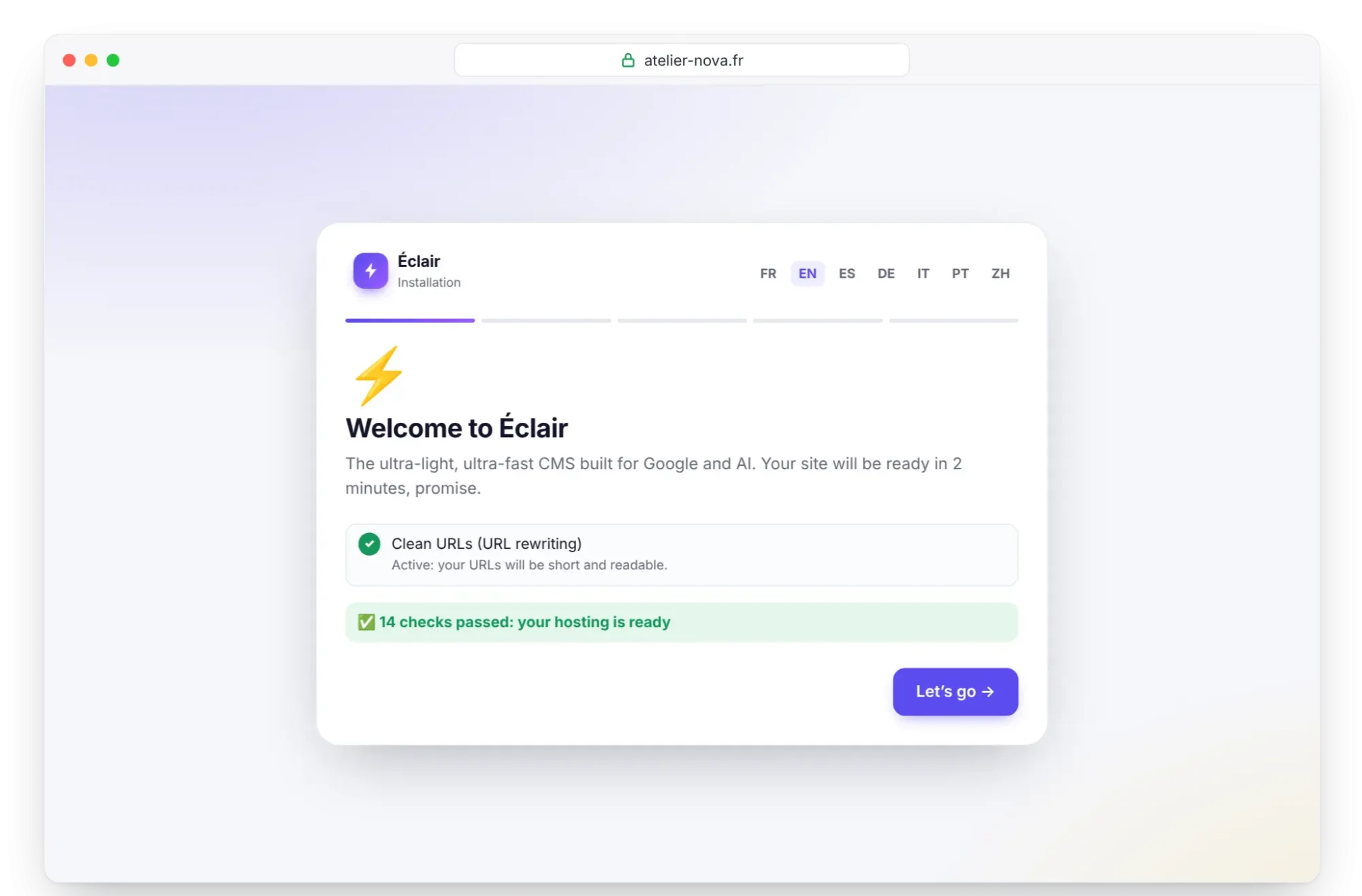
Open https://your-domain.com. If Infomaniak's welcome page still appears, go back to step 3. Otherwise, Éclair's wizard checks the server; the “Clean URLs (URL rewriting)” line must say “Active”, which proves the .htaccess is in place. Click Let's go and answer the 4 questions in Install Éclair step by step, within 2 hours.
Step 6: check after installation
- On the Security page, “Encrypted connection (HTTPS) enforced” and “Site address verified” must be ticked; if not, click Verify the site address.
- The “Folder protection test” must show Protected for each file.
- For the AI assistant, click Test the connection in Settings › AI assistant. If it fails, open an outgoing port (see below).
Pitfalls specific to Infomaniak
index.htmlcomes beforeindex.php: delete the welcome page, or add the lineDirectoryIndex index.phpat the top of Éclair's.htaccess, and add it again after each update.- A permanent PHP upgrade: make the choice knowingly.
- The
/sites/your-domainfolder: older examples use/web. To change it, open your site, click Manage in the Advanced settings section, then Save. - Outgoing ports to open yourself: whether port 443 is in the default list isn't documented. If the test fails, open Security in the Manager, then Port Forwarding (the port opening tool) and Open a Port, with one port and one destination address per rule.
- The Web FTP leaves hidden files out of downloads: a copy made this way has no
.htaccess. Use Éclair's backup instead (Security page). - Hosting in Switzerland, outside the European Union, with daily backups kept for 7 days in another data center.
Install Éclair on Infomaniak: what if something goes wrong?
| Problem | Cause | Solution |
|---|---|---|
| The welcome page still appears | index.html still present | Delete it in Page and Maintenance or in the Web FTP |
| 404 error on every page except the home page | .htaccess not moved | Move it from the eclair folder to /sites/your-domain |
| The PHP version you want doesn't appear | Hosting needs an update | Update the hosting, then go back to step 1 |
| “Can't reach Claude (Anthropic)…” | Outgoing port 443 closed | Security › Port Forwarding in the Manager, to api.anthropic.com |
| Redirect loop after an HTTPS rule | Rule without X-Forwarded-Proto | Use Infomaniak's variant, or delete the rule |
Éclair's other messages are explained on the Troubleshooting page.
Key points
- Choose PHP 8.3 or later under Advanced: the upgrade can't be undone.
- Delete the welcome page, because
index.htmlcomes beforeindex.php. - Extract the archive in
/sites/your-domainwith the Web FTP, then move the contents of theeclairfolder up. - Test outgoing connections and open a port if needed.
Going further
- Prepare your installation and Install Éclair step by step.
- Turn on the built-in AI assistant and Essential settings before launch.
- Choosing your hosting to compare, and the universal FTP method.
- Infomaniak's official help: install a Let's Encrypt certificate and all the FAQs.
Frequently asked questions
Which Infomaniak plan should I choose for Éclair?
Hébergement Web, from CHF 10.91 excl. VAT/month billed annually, with 20 sites included. The Hébergement Starter, free with a domain, only runs static pages.
Why does my site still show the welcome page?
Because Infomaniak serves index.html before index.php. Delete the welcome page in Page and Maintenance, then reload your site.
Can I go back to an older PHP version?
No: moving off a vulnerable version is irreversible at Infomaniak. Éclair needs PHP 8.1 or later and recommends 8.3 or later, so a recent version suits it.
Does my data stay in Switzerland?
Infomaniak states that its infrastructure is developed and hosted in Switzerland. Its daily backups are kept in another data center.