Éclair performance: staying at 100 out of 100
Contents
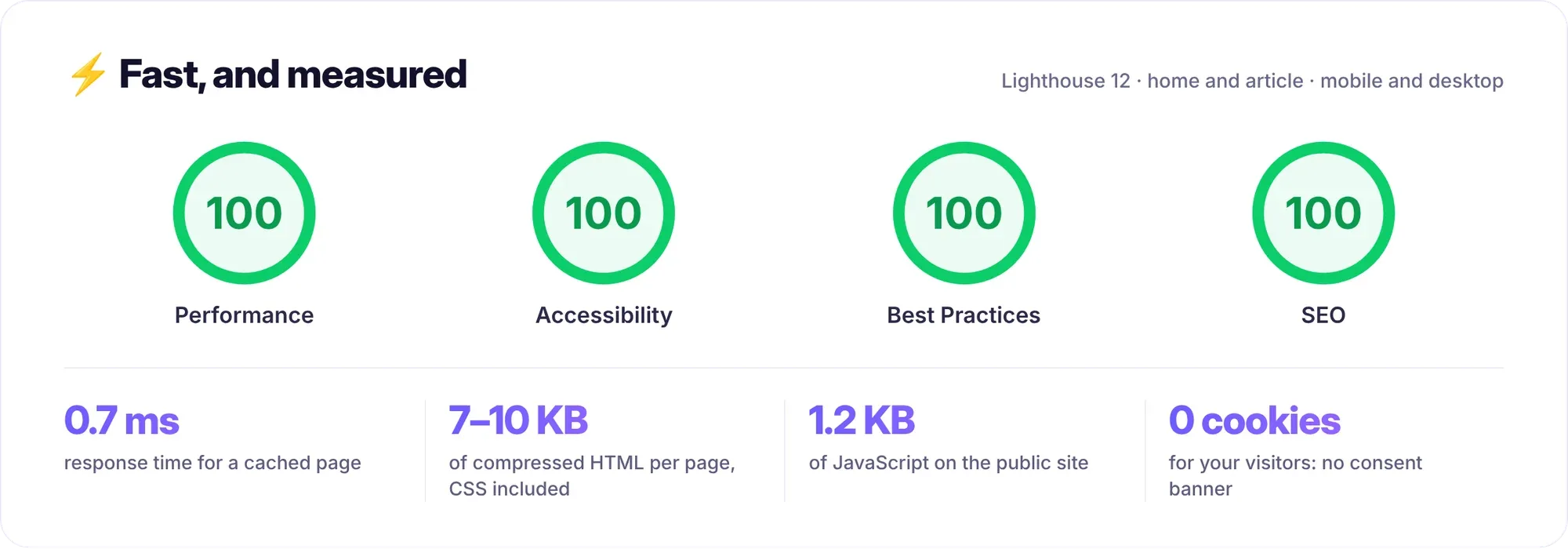
Éclair performance doesn't depend on any cache plugin to configure: it's built into the CMS. Measured locally, the demo site scores 100 in all four Lighthouse categories. This lesson explains where that result comes from, how to measure it on your own site and which decisions bring it down: images, fonts, CSS, videos, scripts and hosting.
What you'll be able to do
Measure correctly
Lighthouse, PageSpeed Insights and server response time.
Keep pages light
Images, fonts, custom CSS and videos.
Avoid the pitfalls
Third-party scripts, audience measurement and CDN caching.
What Éclair already does
| Mechanism | Effect |
|---|---|
static cache: index.php serves the page without loading the application | 0.7 ms server response time, measured locally |
| CSS inlined in the page: 17 to 23 KB, 5 to 6 KB compressed | no render-blocking stylesheet |
| system fonts, or a single preloaded heading font | no layout shift |
| WebP images from 480 to 1600 px, explicit dimensions, lazy loading | the main element displays quickly |
| a single deferred public script: 2.4 KB, 1.2 KB compressed | the browser is never blocked |
Brotli or Gzip, one-year browser caching, versioned ?v=… URLs | later visits download nothing again |
| ETag and 304 responses | an unchanged page isn't sent again |
The repository also publishes its measurements in tests/fixtures/lighthouse-1.8.0.json: mobile Lighthouse, median of three runs, on the home page and a post of the reference site, a sales page, then the home page dressed in the Nocturne, Riviera, Press and Poster directions. The result everywhere: 100 in all four categories, an LCP of 779 to 885 ms, a CLS of 0 and a TBT of 0 to 17 ms.
How do you measure Éclair performance?
- Lighthouse in Chrome: open the page in a private window, because extensions skew the measurement, then open the developer tools and the Lighthouse tab. Choose mobile mode and all four categories, then run the analysis.
- PageSpeed Insights (pagespeed.web.dev): the same analysis, run from Google's servers, with real data from Chrome users when your site has enough of it.
- On the command line, to track changes from one version to the next.
- The server response time, which Lighthouse buries among the rest: measure it separately with curl.
# Mobile Lighthouse (Node.js 22 or later), report opened in the browser
npx lighthouse https://exemple.fr/ --only-categories=performance,accessibility,best-practices,seo --view

# After a change: 1st call (page generated), then 2nd call (static cache)
curl -s -o /dev/null -w 'TTFB : %{time_starttransfer} s\n' https://exemple.fr/
curl -s -o /dev/null -w 'TTFB : %{time_starttransfer} s\n' https://exemple.fr/Response time on shared hosting
The 0.7 ms figure is measured locally. On real hosting, network latency and PHP startup come on top, since even the fast path goes through index.php. Three levers remain in your hands:
- keep the cache on: Settings › Advanced › Static page cache checked, and no
ECLAIR_DEBUGineclair-config.php, which turns it off; - choose PHP 8.3 in your host's control panel and check that OPcache is on, so PHP stops recompiling its scripts on every request;
- host the site close to your visitors, with the help of the hosting comparison.
After every change, Éclair clears the whole cache: the first visit to each page regenerates it, once. The following visits go through the fast path again.
Images: the first thing to watch
Éclair performance mostly comes down to images, since everything else is already tuned. Éclair shrinks each original to 2000 px, re-encodes it, then creates WebP versions at 480, 800, 1200 and 1600 px, keeping only those smaller than the original. A few habits are enough:
- upload photos at least 1600 px wide if they're displayed full width, otherwise the largest version is missing;
- fill in the alt text: Lighthouse checks it in the Accessibility category;
- avoid heavy animated GIFs, which stay GIFs with no WebP version: for an animation, prefer the Video block;
- check that the GD extension supports WebP, otherwise images stay in JPG or PNG;
- put the important image first: the featured image, a hero image or, failing that, an image in the first two blocks loads with priority, and the others load lazily.
Fonts, custom CSS and videos
Fonts. Classic themes only use system fonts, with no download at all. An art direction adds a single heading font of 12 to 27 KB: your server downloads it once from Fontsource, stores it in media/fonts/, then the site preloads it with font-display: optional, with no layout shift. Don't add any other font: custom CSS strips @import rules, and the CSP refuses fonts from another domain.
Custom CSS. It's inlined in every page, along with the theme: every KB you add is downloaded on every visit, with no separate caching. The cap is 64 KB, but aim for a few KB, and don't slip base64-encoded images into it.
Videos. The Video block only shows a play button: no request goes to YouTube or Vimeo before the click. On click, the site's script loads the player from youtube-nocookie.com or player.vimeo.com.
Third-party scripts and audience measurement
The public site's CSP only accepts scripts served by your domain: tag managers, chat widgets and Cloudflare Web Analytics are blocked. That's deliberate, because every third-party script costs loading time and often cookies. To follow your audience without adding anything:
- Search Console and Bing Webmaster Tools give you clicks, impressions and queries, after verification in Settings › SEO;
- your host's statistics, drawn from the server logs, need no script and no cookie;
- on a VPS, a log analyzer such as GoAccess reads the Nginx or Apache logs directly.
A JavaScript analytics tool would force you to modify the templates and the core's CSP, both lost on every update, and then the privacy policy created at installation, which states that the site uses no tracking cookie and no third-party analytics tool.
Do you need a CDN?
Rarely. Pages, already light, leave the static cache in a few milliseconds. A CDN mainly helps with static files when your visitors are far from the server. In that case, don't cache the HTML at the CDN: Éclair couldn't clear it on every publication. The Cloudflare settings are detailed in the Nginx, VPS, proxy and CDN lesson.
The checklist
| Check | Where | Expected |
|---|---|---|
| cache on | Settings › Advanced | X-Cache: HIT on the second call |
| debug mode | eclair-config.php | no ECLAIR_DEBUG |
| PHP version | host's control panel | 8.3, with OPcache on |
| images | Media | at least 1600 px for full width, alt text filled in |
| WebP | source code of a page with images | .webp files in the srcset attributes |
| custom CSS | Settings › Appearance | a few KB |
| videos | Video block | no player before the click |
| third-party scripts | templates | none |
| final measurement | mobile Lighthouse | 100 in all 4 categories, give or take a point |
Key points
- Éclair performance comes from the static cache, inline CSS, WebP images and a single small script: there's nothing to install.
- Measure with Lighthouse in a private window and with PageSpeed Insights, and isolate the server response time with curl.
- Images are the first lever: 1600 px for full width, alt text, no heavy animated GIFs.
- Custom CSS is sent with every page: keep it light.
- Third-party scripts are blocked by the CSP: measure your audience with Search Console and the server logs.
Going further
- Images and the Éclair media library: formats, sizes and alt text.
- Art directions and Design score: the heading font and its guarantees.
- Nginx, VPS, proxy and CDN: compression, browser caching and Cloudflare outside Apache.
- web.dev: Web Vitals, with LCP, CLS and INP explained.
- Chrome for Developers: Lighthouse overview.
Frequently asked questions
Why is my score lower on PageSpeed Insights than locally?
PageSpeed Insights measures from Google's servers, with a simulated phone and network that are slower, and it's affected by your host's latency. Compare several runs and look at the server response time first.
Do I need a cache plugin or a CDN?
Éclair has no plugins and doesn't need one: the static cache is built in. A CDN is still useful for distant visitors, as long as you keep the HTML out of its cache.
Can I add Google Analytics?
Not without modifying the templates and the core's CSP, then your privacy policy. Start with Search Console and your host's statistics, which cost you no points.
Do art directions slow the site down?
They add a heading font of 12 to 27 KB, served by your site and preloaded. The four directions measured in the repository keep 100 in all four categories.